
889434
V2EX  ›  Windows

windows 自带微软拼音输入法 热键占用问题 Ctrl+.

  •  
  •   889434 · May 18, 2021 · 1824 views
    This topic created in 1834 days ago, the information mentioned may be changed or developed.

    问题:在 edge 浏览器使用 Surfingkeys 插件时, 按 t 打开弹窗查找地址(历史,书签等), 结果列表有多页, 使用插件文档中的快捷键翻页,

    • Ctrl-. to show results of next page 按键无效
    • Ctrl-, to show results of previous page 按键有效

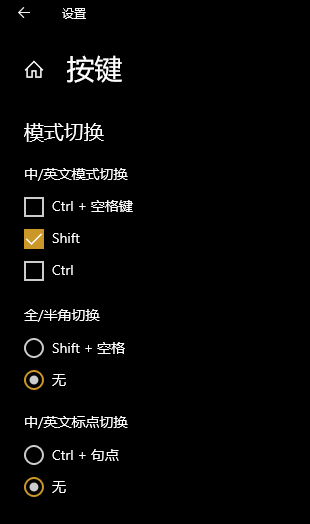
    经过网上查找 发现是 windows 里安装的微软拼音输入法 占用了 ctrl+. 在设置里关闭了 ctrl+. 切换中英文标点功能, 按键仍被占用 输入法设置
    相关链接

    有哪位大佬知道咋解决吗

    (ps: 我查看了插件文档和插件的高级设置默认配置, 未找到能更换快捷键的方法)

    3 replies    2021-05-18 11:11:24 +08:00
    ragnaroks
        1
    ragnaroks  
       May 18, 2021
    恢复到旧版输入法试试
    mgrddsj
        2
    mgrddsj  
       May 18, 2021
    专门去 Edge Add-ons store 下载了这个插件,看见了楼主的评论。
    在这个拓展的设置界面,勾选 advanced mode,然后可以自定义 mapping 。我在 report issues 链接(跳转到 GitHub issues )里找到了这条相关 issue: https://github.com/brookhong/Surfingkeys/issues/1003
    889434
        3
    889434  
    OP
       May 18, 2021
    @mgrddsj 感谢老哥 之前按配置示例用 map 重新定义按键也不行 看了 issue 用 cmap 可以了 文档也有说明要用 cmap, 我没看仔细,cmap could be used for Omnibar to change mappings, for example: https://github.com/brookhong/Surfingkeys#omnibar
    About   ·   Help   ·   Advertise   ·   Blog   ·   API   ·   FAQ   ·   Solana   ·   3946 Online   Highest 6679   ·     Select Language
    创意工作者们的社区
    World is powered by solitude
    VERSION: 3.9.8.5 · 37ms · UTC 05:11 · PVG 13:11 · LAX 22:11 · JFK 01:11
    ♥ Do have faith in what you're doing.